Showing posts with label software. Show all posts

Monday, January 05, 2009

New Year, New Start

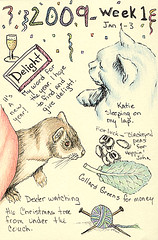
First week of 2009, Sydney Harper
pen and colored pencil in sketchbook

Rick and I have been off between Christmas and today. It's been wonderfully relaxing and much needed. We've all been doing a lot of sleeping but I think we needed it. Tomorrow it's back to the routine, though. I'm starting to feel a little restless so I guess it's just as well. I decided that I would do a weekly combo sketch. I may not do it every week, but I like the idea. I'm ready to move on to a new year. Last year was an okay year and ended on a good note, but I'm hoping for a better one this year.

I'm taking
Christine Kane's advice and picking a word for the year. My word is Delight. I hope to find delight and give delight to others this year. Then to take it a step further, I decided to keep my goals simple too.

Enjoy
Be Creative
Make Money
Promote
Participate
Be Healthy

Obviously I don't have complete control over all of these, such as money and health, but my plan is to do my best. I have more specific plans for the year but I want to focus where I'm headed rather than specifics. One thing I want to do this year is learn Photoshop and Illustrator. I've already started learning Photoshop with the
Adobe Photoshop CS4 Classroom in a Book. The instructions are good and I've having a great time with it. I don't know how it compares to the other books that are available but this one has been easy to follow. I've been moving through the book at a pretty good clip since I've been on vacation. Once I finish this book, I'll move on to Illustrator.

Wednesday, October 03, 2007

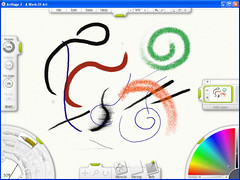
ArtRage Paint Software


I have been playing with ArtRage software lately. I'm a rank beginner when it comes to digital art and I'm not even sure yet how much I like it. This program suits me perfectly. The registered version is a whole $25 US and they have a limited functionality demo that you can download. I discovered it from a mention on Nancy Stahl's blog (scroll down). For me it's an inexpensive way to try out digital art. It works best with a drawing tablet. I have an inexpensive Manhattan drawing tablet that works well. Drawing with a tablet is like starting over again though. I found I had to spend some time just developing my hand-eye coordination. There's some good information on starting with tablets at DaniDraws.com as well as a number of links to tutorials. It's been a fun experiment.